VS Code extension
Large CSV Viewer
Open CSV and TSV files of hundreds of MB or several GB in VS Code. The first rows are on screen in a fraction of a second, while the rest of the file is indexed in the background. Read-only, so your file is never changed.
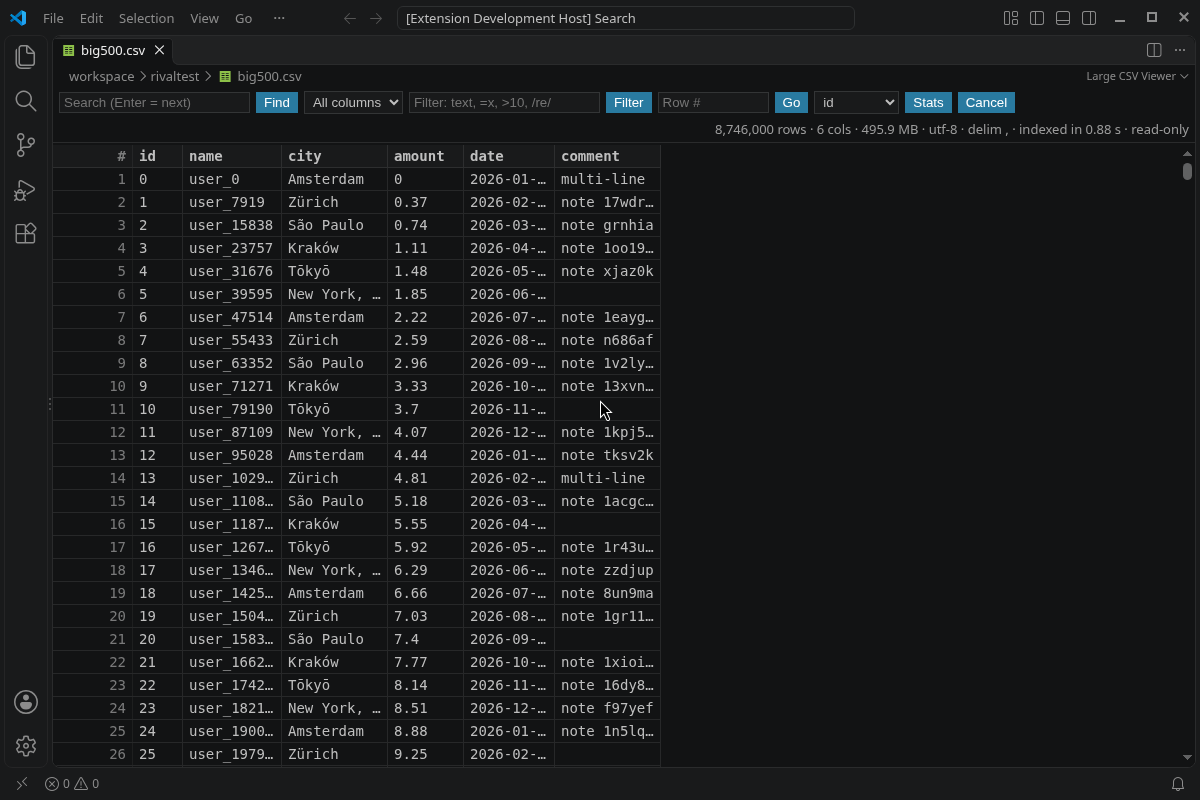
Measured
- 496 MB CSV with 8.7 million rows: first rows on screen in about 0.2 seconds in VS Code 1.142 (median of 5 runs).
- Whole file indexed in about 1 second. You can scroll while it runs.
- Jump to any row, including the last one, in a few milliseconds.
- Filter, search, sort and column stats over all rows run in a background thread. Filter results start to appear after about 0.2 seconds.
Features
- Detects the delimiter (comma, semicolon, tab, pipe) and the encoding (UTF-8, UTF-16, with or without BOM).
- Correct with quoted fields, escaped quotes and line breaks inside fields.
- Sort by any column: numbers as numbers, text in natural order.
- Filter one column or all: contains, equals, does not contain, greater or less than, or a regular expression.
- Find next, jump to row, and column stats: count, empty, min, max and distinct values.
- Does not take over
.csvfiles. Open a file with right-click, Open in Large CSV Viewer, or Reopen Editor With. - No telemetry and no network access.
Install
Price
Free.