CSV too large for Excel? Four ways to open a big CSV file
You double-click a CSV export, Excel thinks for a while, and then tells you the file was not loaded completely. Nothing is broken. Excel simply has a hard limit, and your file is past it.
Why Excel cuts off your CSV
An Excel worksheet holds at most 1,048,576 rows and 16,384 columns (source: Microsoft). Anything after row 1,048,576 is dropped when you open the file. If you then save it, those rows are gone from the saved copy too.
So the first rule: never save a large CSV from Excel after that warning. Keep the original.
1. Only need to look? Use a viewer that reads the file as it is
Most of the time you don't want to edit 8 million rows. You want to check what's in the export, find a few records, or see if a column has empty values. A read-only viewer does that without loading the whole file into a spreadsheet.
If you use VS Code, Large CSV Viewer is a free extension built for this:
- In our test a 496 MB CSV with 8.7 million rows showed its first rows in about 0.2 seconds, and the whole file was indexed in about 1 second.
- Filter, search, sort and column stats (count, empty, min, max, distinct) run over all rows, not just the first million.
- It detects comma, semicolon, tab or pipe as the delimiter, and handles quoted fields with line breaks inside.
- It is read-only, so the file on disk is never changed. No telemetry, no network access.
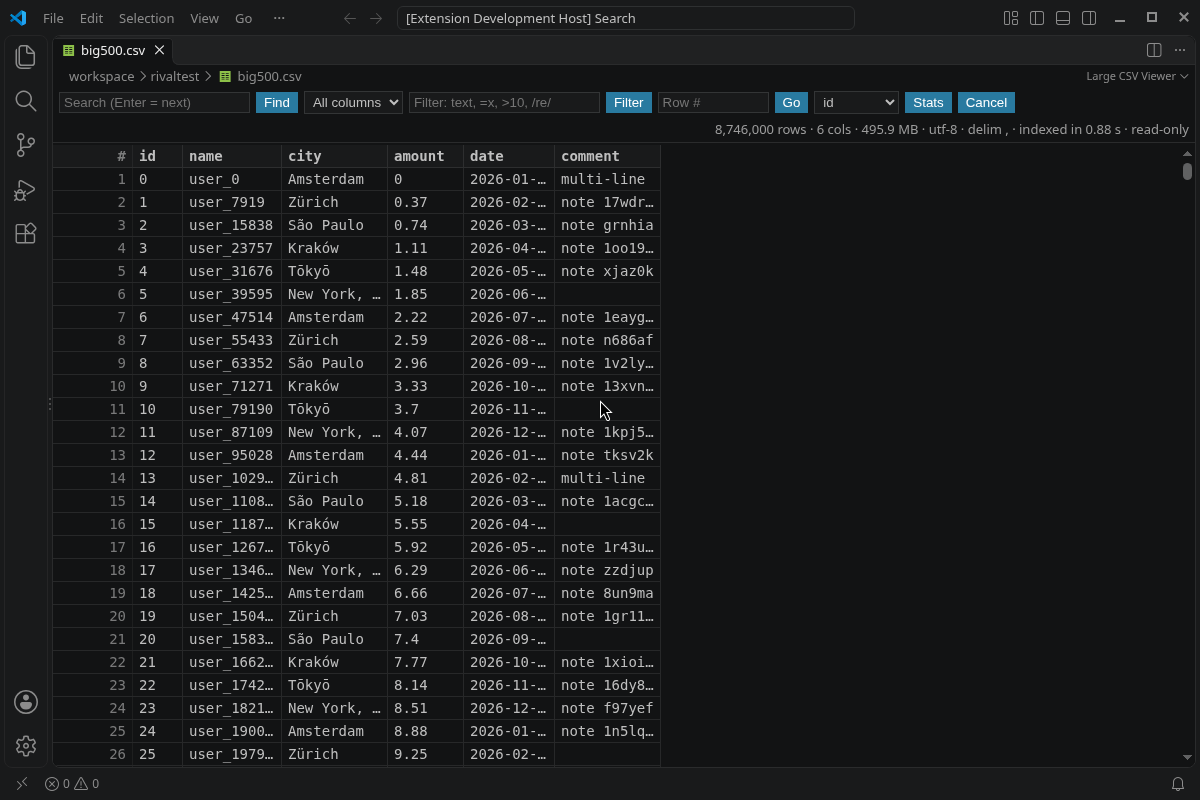
Install it from the Visual Studio Marketplace or Open VSX.
2. Need it in Excel anyway? Load it into the Data Model
In Excel you can import the file through Data > From Text/CSV and choose to load it to the Data Model instead of a sheet. The rows then live outside the worksheet grid, and you work with them through a PivotTable. This is fine for totals and summaries, less handy for scrolling through raw rows.
3. Split the file into smaller parts
If someone else needs the data in a normal spreadsheet, split the CSV into chunks under the row limit. On macOS or Linux the built-in split command does it, for example split -l 1000000 data.csv part_. Remember that only the first part keeps the header row, so copy it to the top of the others.
4. Put it in a database
When you need joins, repeated queries or edits, import the CSV into a database such as SQLite. That's more setup, but it's the right tool once you are doing real analysis rather than a quick look.
Which one should you pick?
- Just checking an export, hunting for a row, or looking for empty values: a viewer (option 1).
- Summaries and pivot tables in Excel: the Data Model (option 2).
- Handing the data to someone who only uses spreadsheets: split it (option 3).
- Ongoing analysis: a database (option 4).
FAQ
How many rows can Excel open?
1,048,576 rows per sheet. Google Sheets has a cell limit for the whole spreadsheet rather than a row limit, so big files run into trouble there as well.
Will I lose data if Excel says the file was not loaded completely?
Not in the original file. You only lose rows if you save over it from Excel.
Does Large CSV Viewer change my file?
No. It is read-only and does not upload anything.
Is it free?
Yes, Large CSV Viewer is free.