Browser extension · Chrome, Edge, Brave
OutlineKit: CSS Layout Outliner
See every box on a page: clean outlines by depth or tag, hover labels, spacing view. No fills unless you want them.
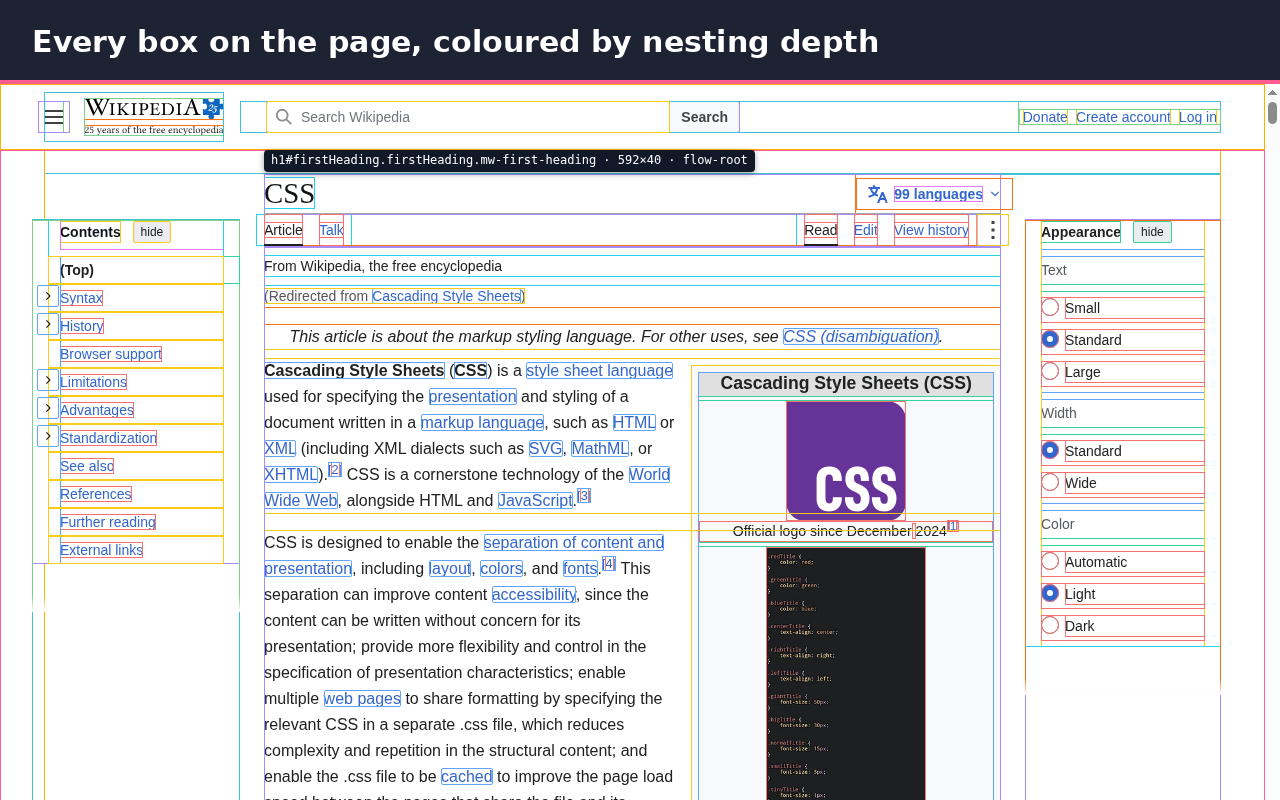
OutlineKit draws a thin outline around every element on the page so you can see the layout at a glance. It is made for front-end developers, designers and anyone fixing a broken layout.
Outlines only. OutlineKit never paints coloured blocks over the page unless you turn on light fills yourself, so you can still read the text and see the real colours.
Free features:
- Outline every element, coloured by nesting depth, by tag, or in one colour
- Outlines sit inside each box, so overflow: hidden does not cut them off
- Hover label with tag, id, classes, width × height, display and position
- Keyboard shortcuts: Alt+Shift+O for outlines, Alt+Shift+L for labels (change them at chrome://extensions/shortcuts)
- Hold Alt to freeze the label, Esc to hide it
- Line width and opacity sliders
- Skip list: leave out cookie bars, chat widgets or any CSS selector
- Works inside open shadow DOM (web components) and inside frames
- Works per tab: turning it on in one tab does not affect other tabs
- Optional light background fills when you want them
Pro (EUR 5, one payment, no subscription):
- Spacing view: margin, padding and content boxes with pixel values on hover
- Limit outlines to one part of the page (for example main or .card)
- Your own depth colours
- Start automatically on the sites you choose
Privacy: OutlineKit only runs on a tab after you click its icon or press the shortcut. It has no access to your sites at install. It does not collect, store or send any data. There are no analytics and no ads. Settings stay in your browser.
Works in Chrome, Brave, Edge and other Chromium browsers.
Install and price
OutlineKit is free. The Chrome Web Store listing is in review; the install link will be added here when it is live. Pro costs €5, one payment, no subscription: Buy Pro on Gumroad