How to check SPF and DMARC for many domains at once
If you look after more than a handful of domains (client sites, old brand names, parked domains, a list of suppliers), sooner or later someone asks: which of these can send mail safely, and which ones could be spoofed? Since February 2024 it matters more, because Google expects anyone sending 5,000 or more messages a day to Gmail to have SPF, DKIM and DMARC in place (Google's sender guidelines).
Checking one domain is quick. Checking two hundred by hand is an afternoon gone. Here's how to do both, and how to read what comes back.
What you're actually looking for
Both records live in DNS as plain TXT records.
- SPF sits on the domain itself and starts with
v=spf1. It lists the servers allowed to send mail for that domain, and ends with a rule for everyone else:-all(reject),~all(soft fail) or?all(no opinion). The spec is RFC 7208. - DMARC sits on
_dmarc.yourdomain.comand starts withv=DMARC1. The part that matters most is the policy:p=none(just report),p=quarantine(send to spam) orp=reject(block). The spec is RFC 7489.
A domain that sends no mail at all should still have both, set to block everything (v=spf1 -all and a DMARC p=reject). Parked domains without them are an easy target for spoofing.
1. One domain: use the command line
On macOS or Linux:
dig +short TXT example.com
dig +short TXT _dmarc.example.com
On Windows:
nslookup -type=TXT example.com
nslookup -type=TXT _dmarc.example.com
Look for the line starting with v=spf1 in the first answer and v=DMARC1 in the second. No answer means no record.
This is free and exact. It just doesn't scale, and you still have to copy the answers into a sheet yourself.
2. A few domains: a free web checker
Plenty of free sites let you paste a domain and see its SPF and DMARC with a short explanation. They're handy for a quick look, but most take one domain at a time, many ask for your email address before a bulk check, and you end up with screenshots instead of data.
3. Hundreds or thousands: run a bulk check
When you have a list, the fastest route is a tool that takes the whole list and hands back one row per domain. Our Bulk WHOIS & DNS Lookup on Apify does this. Paste your domains, run it, and each row tells you:
dns.emailSecurity.hasMx(CSV:dns/emailSecurity/hasMx): whether the domain has an MX recorddns.emailSecurity.spfandspfValid(CSV:dns/emailSecurity/spf,dns/emailSecurity/spfValid): the SPF record, and whether exactly one SPF record was found (more than one is invalid)dns.emailSecurity.dmarcanddmarcPolicy(CSV:dns/emailSecurity/dmarc,dns/emailSecurity/dmarcPolicy): the DMARC record and its policy (none,quarantineorreject)
In the same run you also get the registrar, the expiry date and daysToExpiry, nameservers, and the A, AAAA, MX, NS, TXT and CAA records. So one list gives you an email security check and an expiry check together.
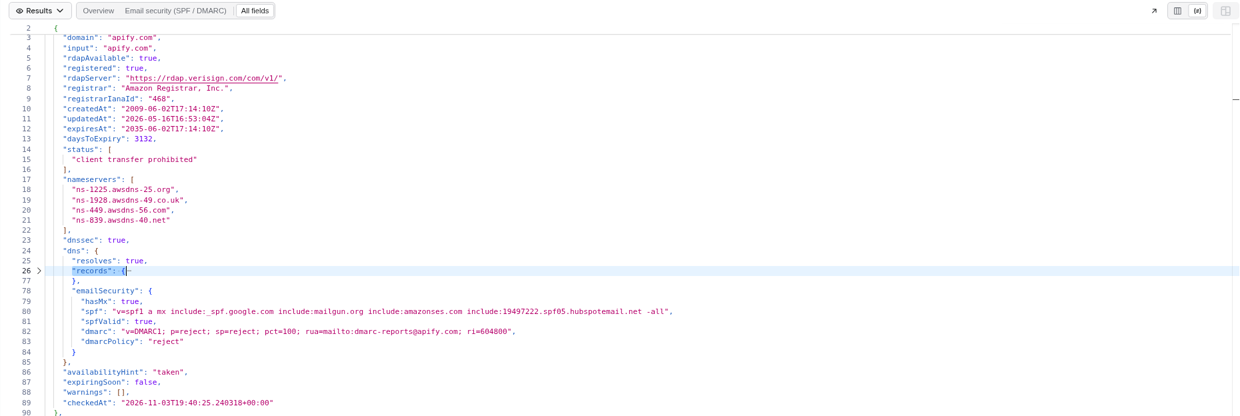
Raw JSON output view from a real run (3 Nov 2026), with dns.emailSecurity expanded.
It costs $0.00097 per domain with no start fee. Unregistered domains are charged (you get the availability hint and DNS); only invalid input and failed lookups are free. 1,000 domains come to $0.97, which fits in the $5 of prepaid usage on Apify's free plan, so you can test it on your own list before paying anything. Export the results as CSV or Excel and sort.
It doesn't check DKIM. DKIM records sit under a selector name that each sending service picks (for example google._domainkey), so they can't be found from the domain name alone. Check DKIM per sender, using the selector your mail provider gives you.
Reading the results: what to fix first
Sort your sheet and work through it in this order:
- Has MX but no SPF. The domain receives mail but says nothing about who may send it. Add an SPF record listing your real senders.
- No DMARC. Add one, starting with
p=noneand a report address, so you can see who sends as you before you block anything. - DMARC stuck on
p=none. Fine for a few weeks. If it's been there for a year, move toquarantine, thenreject. - No MX and no SPF or DMARC. Usually a parked domain. Add
v=spf1 -alland a DMARCp=rejectso nobody can send as it. - More than one SPF record, or SPF ending in
+all. Both break SPF. Merge them into one record and end with~allor-all.
While you're in the sheet, sort by daysToExpiry. A domain that lapses takes its mail and its SPF with it.
Run it again every month
DNS changes quietly: a new mail tool gets added, someone edits a record, a domain moves registrar. Running the same list once a month on a schedule takes a few cents and catches changes before your mail starts landing in spam.
Questions about the tool? Visit our support page.